
Google Ads
Edit a Google Ads campaign
The campaign's name, budget, bid strategy, conversions, UTMs, extensions, locations, audiences and schedule in one panel.
Quick answer
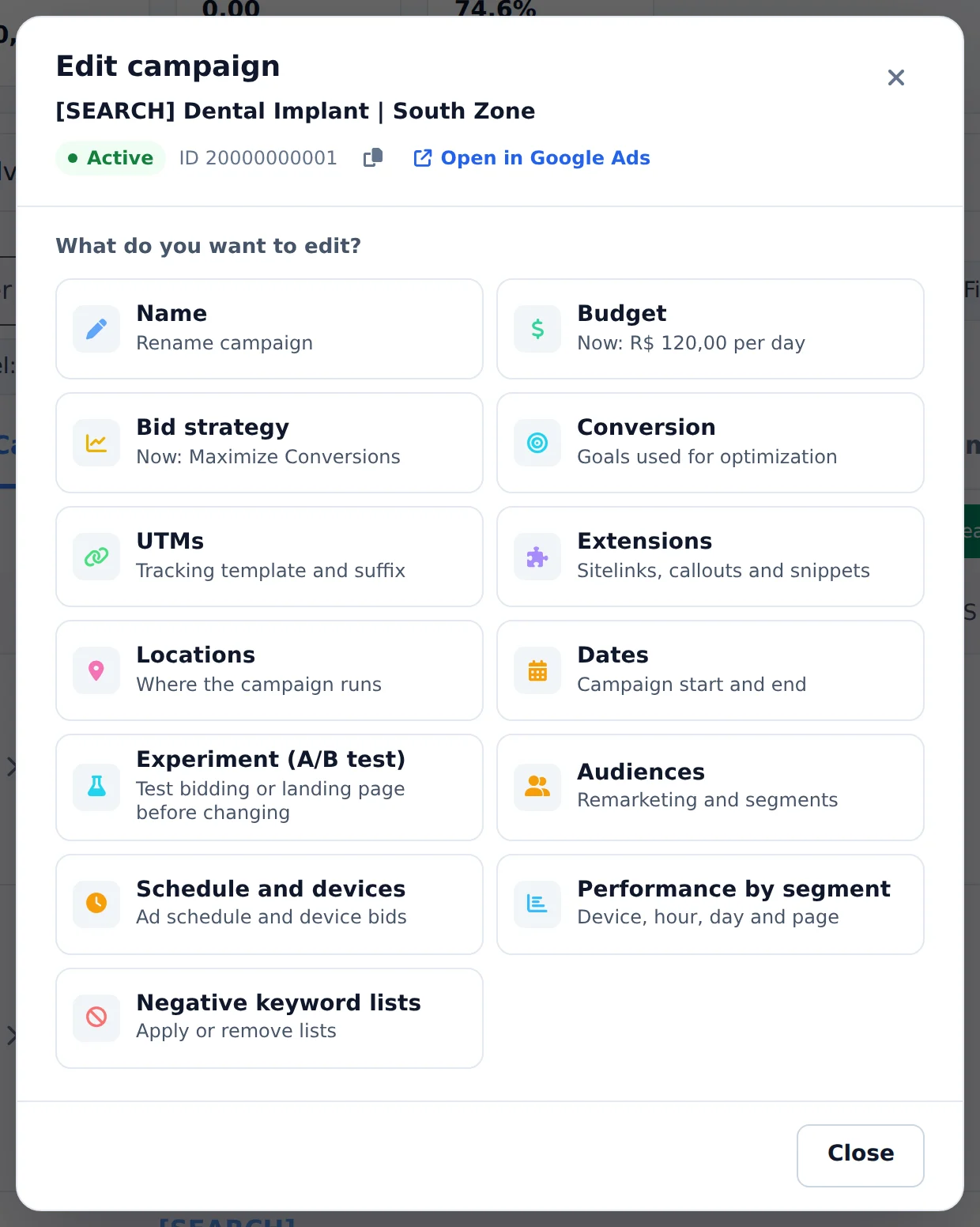
In Google Ads, click Edit, below the campaign name. The What do you want to edit? panel shows one card per setting: Budget, Bid strategy, Conversion, UTMs, Extensions, Locations, audiences, schedule and more. Click the card, change the value and save: the change goes straight to Google Ads.
Watch the walkthrough 0:22
Before you start
- The same Edit button exists on the ad group row, with the ad group settings: name, ad group CPA, keywords, demographics and extensions.
- In Performance Max, the asset group Edit opens the texts, images, URL and search themes.
- Changing the bid strategy restarts the campaign learning in Google. Avoid changing it often.
Step by step
In this example, we adjust the budget and bid strategy of the dental implant Search campaign.
- 1
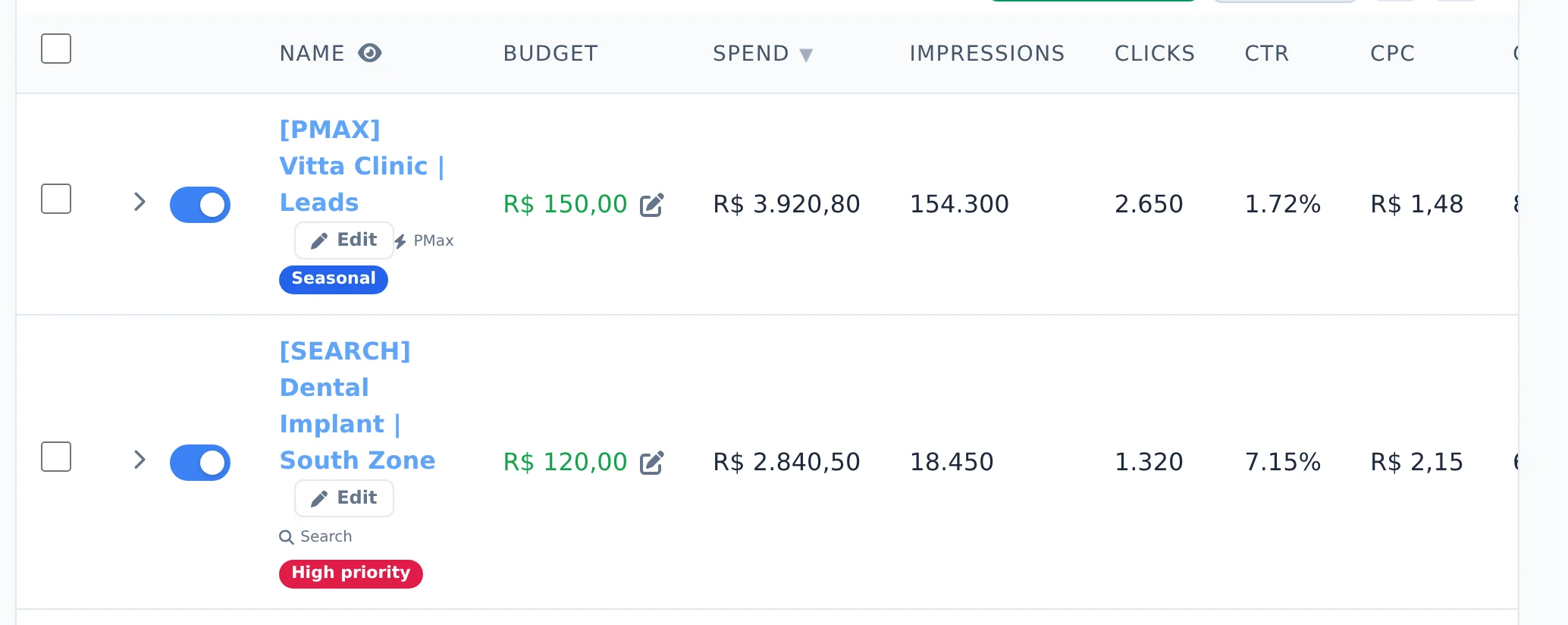
Click Edit on the campaign
In the Campaigns tab, each row has the Edit button below the campaign name. Click it. Do not click the blue switch: it pauses the campaign right away.
 1
1- 1Edit
- 2
Choose what to change
The What do you want to edit? panel shows the cards, each with the current value below its name. The lower ones bring schedule and devices, audiences, dates, A/B test, negative lists and labels.
 123
123- 1Budget
- 2Bid strategy
- 3Locations
- 3
Adjust the budget
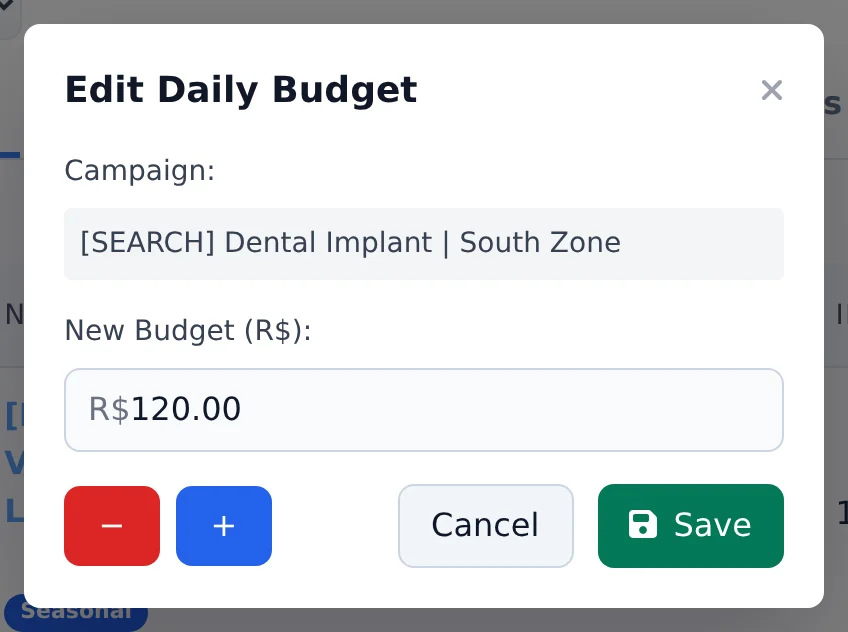
In the Budget card, type the new daily amount or use the minus and plus buttons, which open percentage shortcuts. Click Save.
 123
123- 1Daily budget
- 2Raise by percentage
- 3Save
- 4
Change the bid strategy
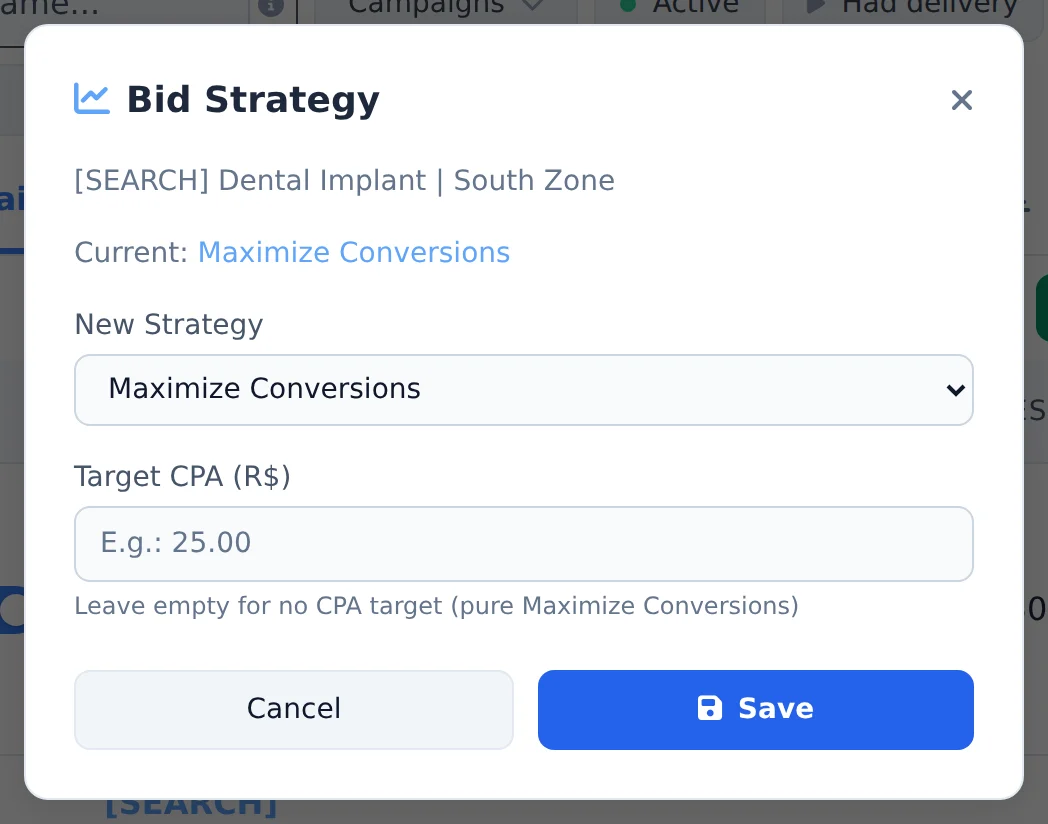
In the Bid strategy card, pick the New Strategy: Maximize Conversions, Maximize Conversion Value, Target CPA, Target ROAS, Maximize Clicks or Manual CPC. For Target CPA, enter the amount; for Target ROAS, a number like 4.0 (400%). Click Save.
 123
123- 1Current strategy
- 2New strategy
- 3Save
Several campaigns at once
To change the strategy, conversion, UTMs or dates of several campaigns together, check the campaigns, click Bulk Edit and open Edit campaigns in the bottom bar.
How to tell it worked
- The notice in the corner confirms the change.
- When you open Edit again, the card shows the new value below its name.
- In the table, the Budget column and the strategy badge change right away.
If something goes wrong
| Symptom | Likely cause | What to do |
|---|---|---|
| Invalid bid strategy error | The chosen strategy does not fit this campaign type | Pick another strategy from the list and save again |
| The campaign lost performance after the change | The new strategy restarted Google learning | Wait a few days before changing it again |
| The card I am looking for is not there | Some settings only exist for certain campaign types | In Performance Max, use the asset group Edit |
Frequently asked questions
How do I change the bidding strategy for a Google Ads campaign?
On the campaign row, click the Bid Strategy indicator (or open View details and click the strategy). In the modal, choose the New Strategy from: Maximize Conversions, Maximize Conversion Value, Target CPA, Target ROAS, Maximize Clicks (Target Spend), Impression Share, Manual CPC or Optimized CPC. For Maximize Conversions and Target CPA, you can enter a Target CPA in your account currency. If you leave it empty, it's plain Maximize Conversions with no target. For Maximize Conversion Value and Target ROAS, enter the ROAS as a decimal number (for example, 4.0 equals 400%); empty means no ROAS target. The change applies immediately, but note that switching strategies restarts the campaign's learning on Google, so avoid frequent changes.
How do I change the daily budget for a Google Ads campaign?
In the campaigns table, hover over the budget amount and click the edit icon (Edit Budget). In the Edit Daily Budget modal, type the new amount or use the minus and plus buttons, which open percentage shortcuts (10%, 15%, 25% and 35%) to quickly increase or decrease it. Click Save and the change is applied right away in Google Ads. To change several campaigns at once, turn on Bulk edits, select the campaigns and use the Change Budget button in the bar at the bottom of the screen. Note: campaigns that share a budget on Google may behave differently, since the amount you edit is the budget linked to the campaign.
How do I edit the asset group of a Performance Max campaign?
On screen: in Google Ads, open Edit asset group for the Performance Max campaign and adjust the group's assets.
You can also do it through AI Copilot or Ads Editor's MCP in your AI tool (Claude, Cursor, etc.):
- Ask to see the campaign's asset group (or to list the groups): each asset appears with its link.
- Ask for the edit: you can add headlines, long headlines, descriptions, business name, images (already in the account or uploaded on the spot), YouTube videos and search themes; remove assets by link; and change the name, final URL, status (active or paused) and paths.
Google's minimums must still be met after the edit: 3 headlines, 1 long headline, 2 descriptions, 1 landscape image, 1 square image and 1 logo. Ads Editor checks this and validates with Google before applying. To create a PMax campaign from scratch, use Create Campaign in Google Ads (type Performance Max) or ask AI Copilot or MCP.
Error: Invalid bid strategy (Google Ads)
The bid strategy provided isn't valid for this campaign (e.g., an unrecognized strategy value).
How to fix it:
- Choose a supported bid strategy (e.g., Maximize conversions, Target CPA, Manual CPC).
- Resubmit the change.
See also
Budget, pause and activate in bulk in Google AdsThe Google Ads managerSitelinks, callouts and snippets in Google Ads