
Meta Ads
Edit ad sets in bulk
Change audiences, age, gender, location, placement and Advantage+ of several ad sets at once, seeing what each one has today.
Quick answer
In Meta Ads, open the Ad Sets tab, check the ad sets and click Bulk Edit. Under Edit Ad Set, pick what to change: Edit Age, Edit Gender, Edit Placement, Edit Location, Edit Audiences or Advantage+ audience. The window shows what each ad set has today; use Apply to all and click Save changes.
Watch the walkthrough 0:34
Before you start
- Each option changes only that field: editing the location, for example, keeps age, gender, audiences and placements.
- For location you can add to what exists or replace everything, including the radius in kilometers. No ad set is left without a location.
- Changing the audience may restart the ad set learning on Meta.
Step by step
In this example, we add a saved audience and an interest to two ad sets at once.
- 1
Select the ad sets
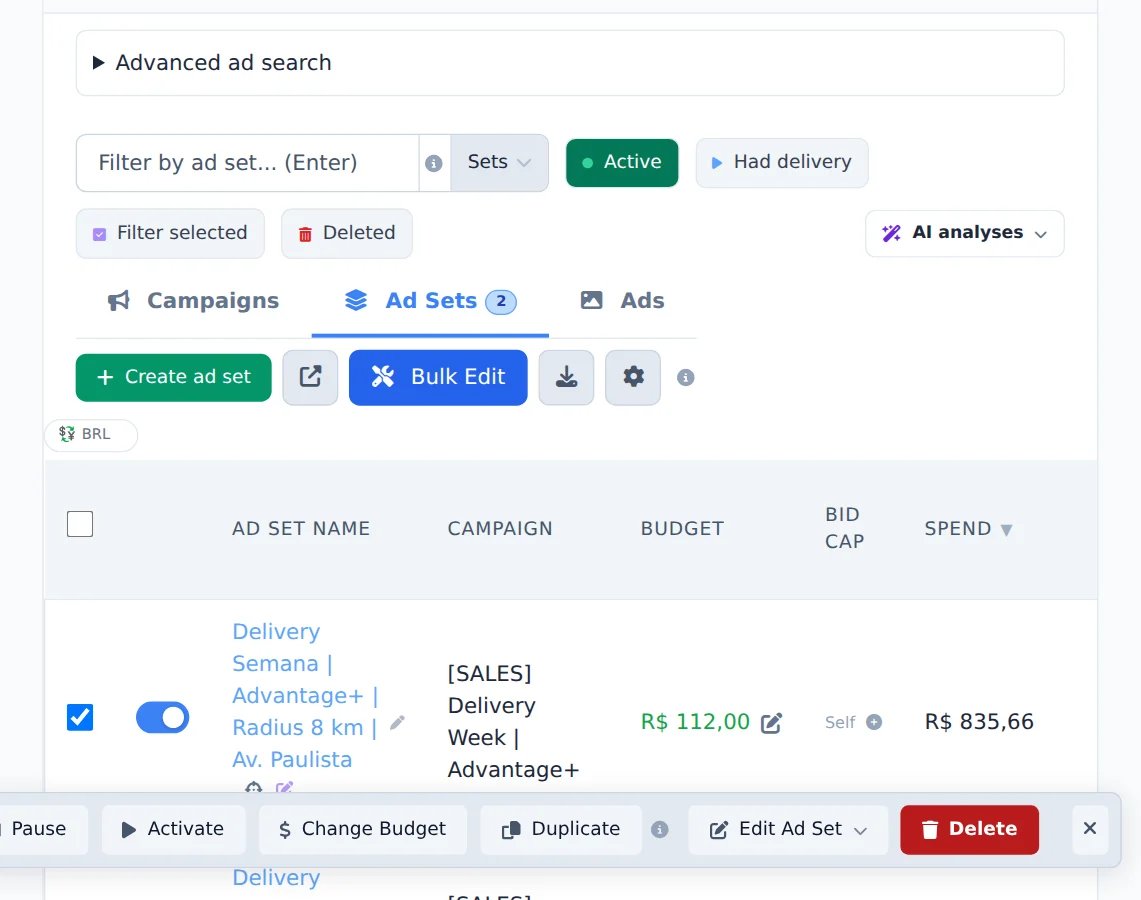
Open the Ad Sets tab, check the ad sets that will change and click Bulk Edit.
- 2
Choose what to edit
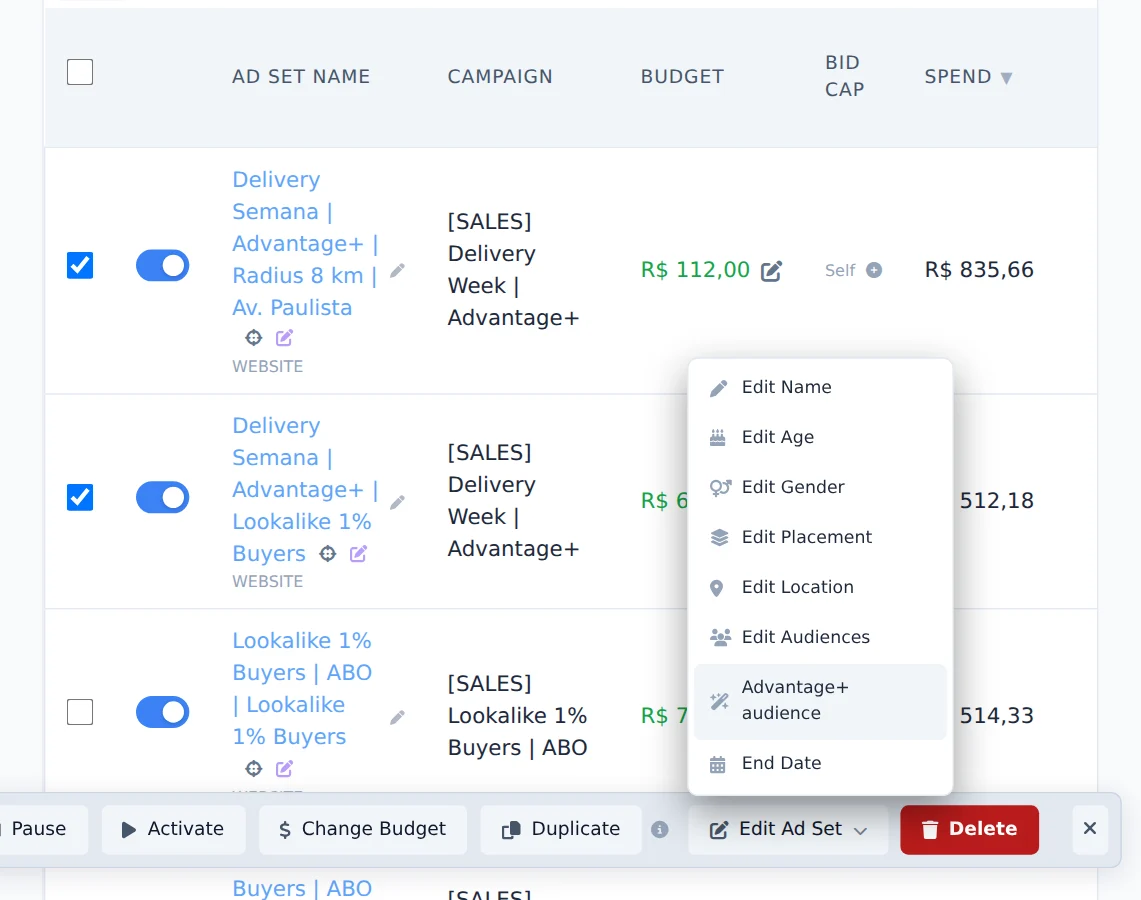
Click Edit Ad Set. The menu has age, gender, placement, location, audiences and Advantage+ audience. Here, pick Edit Audiences.
- 3
Apply to all
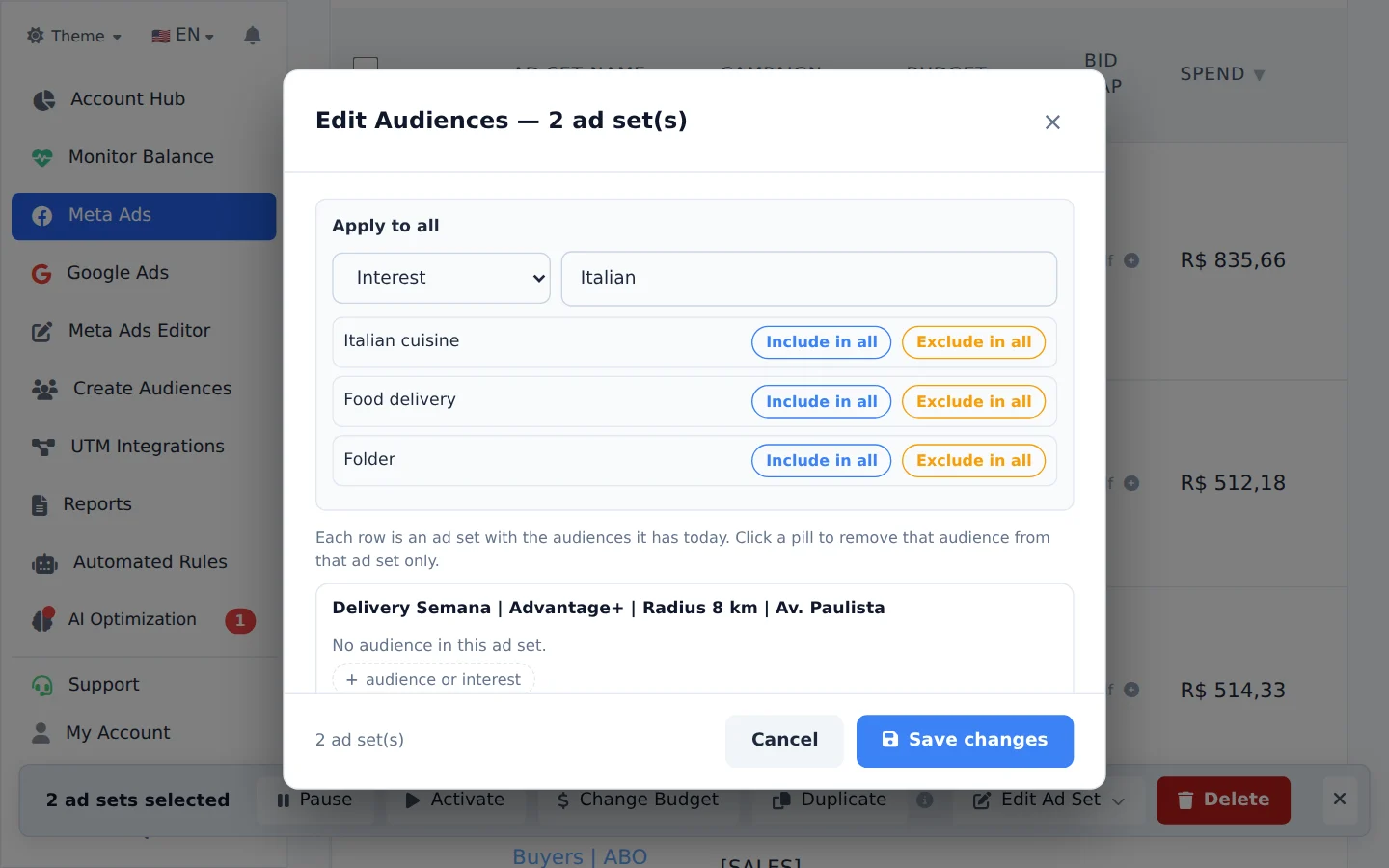
Each row shows what the ad set has today. Under Apply to all, search the saved audience and click it to add it to all of them. For interests, switch the search type and look up the topic. Check and click Save changes.
Turn off Advantage+ on several ad sets
Under Edit Ad Set, Advantage+ audience turns Meta automatic audience on or off, and Edit Placement switches between Advantage+ (automatic) and Manual, on every checked ad set.
How to tell it worked
- The window shows the progress until the end, with no error.
- When you open the edit again, each row already shows the new value.
If something goes wrong
| Symptom | Likely cause | What to do |
|---|---|---|
| Edit Ad Set does not show in the bar | You are on the Campaigns or Ads tab | Switch to the Ad Sets tab |
| One ad set was not changed | Meta refused the change, for example an audience from another account | Read the reason in the window and adjust that ad set |
Frequently asked questions
How do I make bulk changes to Meta Ads (budget, age, gender)?
In Meta Ads you can edit several items at once:
- Open Meta Ads and click Bulk edits, above the table.
- Go to the tab for the level you want to change (campaigns, ad sets, or ads) and select the items.
- Use the bar that appears at the bottom.
Ad Sets: the Edit Ad Set menu includes Edit Name, Edit Age, Edit Gender, Edit Placements, Edit Location, Edit Audiences, and Advantage+ Audience. These edits apply only to ad sets: if campaigns or ads are selected, the menu does not appear.
Ads: the Edit Ad menu includes name, text, headline, Button (CTA), URL, WhatsApp, URL Parameters, Registration Form, Facebook Page, Instagram, and Deactivate Advantage+.
Budget: click Change Budget (available on the campaigns and ad sets tabs). Enter the new daily amount, or use the + and - buttons, which offer shortcuts of 10%, 15%, 25%, and 35% up or down. Then click Save. For campaigns, only CBO campaigns have a campaign-level budget. For ABO campaigns, change the budget on the ad sets. Ads have no budget.
Can I edit the location of multiple ad sets at once?
Yes, just like in Meta, but in bulk.
- In the Manager (Meta), go to the ad sets tab and select the ad sets you want to change.
- In bulk edits, choose Location.
- The modal shows what each ad set has today, one per row, so you're not choosing in the dark.
- Use the top row to change all of them at once: add new locations, remove locations, or adjust the radius in kilometers (for cities and addresses).
- Choose whether to add to what's already there or replace everything, then save.
Important: only the location changes. Age, gender, audiences and placements on each ad set are preserved. The system also refuses to leave an ad set with no location at all, so you can't accidentally end up targeting all of Brazil.
You can also ask AI Copilot to do this: "add Curitiba with a 30km radius to all ad sets in campaign X".
How do I turn off Advantage+ audience or Advantage+ placements for multiple ad sets at once?
Both are under Bulk edits in Meta Ads:
- Open Meta Ads and click Bulk edits, above the table.
- Select the ad sets.
- In the bar that appears at the bottom, open Edit Ad Set.
Advantage+ Audience: choose Advantage+ Audience, select Disable (or Enable), click Apply to all and then Save changes.
Placements: choose Edit Placements. The Advantage+ (automatic placements) option lets Meta decide where to show your ads; Manual shows all platforms and positions already selected so you can deselect what you don't want; Don't change placements keeps what each ad set already has (useful when you only want to change the device targeting).
The automatic creative enhancements (Advantage+ Creative) are on the ads: Bulk edits → select the ads → Ad recommendations → Disable or Enable.