
Google Ads
The Google Ads manager
Campaigns, ad groups, ads and search terms from all your Google accounts, with the numbers for the period, on one screen.
Quick answer
Open Google Ads in the side menu, pick the account in the selector at the top and the period in Last 7 days. The Period Summary shows the account numbers, and the table lists the campaigns. The Ad Groups, Ads and Search Terms tabs go one level down.
Watch the walkthrough 0:32
Before you start
- Google Ads must be connected in Connect Google, with the accounts you will manage turned on.
- You can open several accounts at once: the table and the summary add up the data from all of them.
- Video (YouTube) campaigns show their metrics, but Google does not allow editing that type through the API.
Step by step
In this example, we open the account of a dental clinic with Search, Performance Max and Display campaigns.
- 1
Pick the account and period
Click the account selector at the top, search by name in Search accounts, check one or more accounts and click Open. The star next to an account keeps it at the top of the list. The period sits in the blue Last 7 days button and applies to every tab.
 12
12- 1Google account selector
- 2Metrics period
- 2
Read the summary
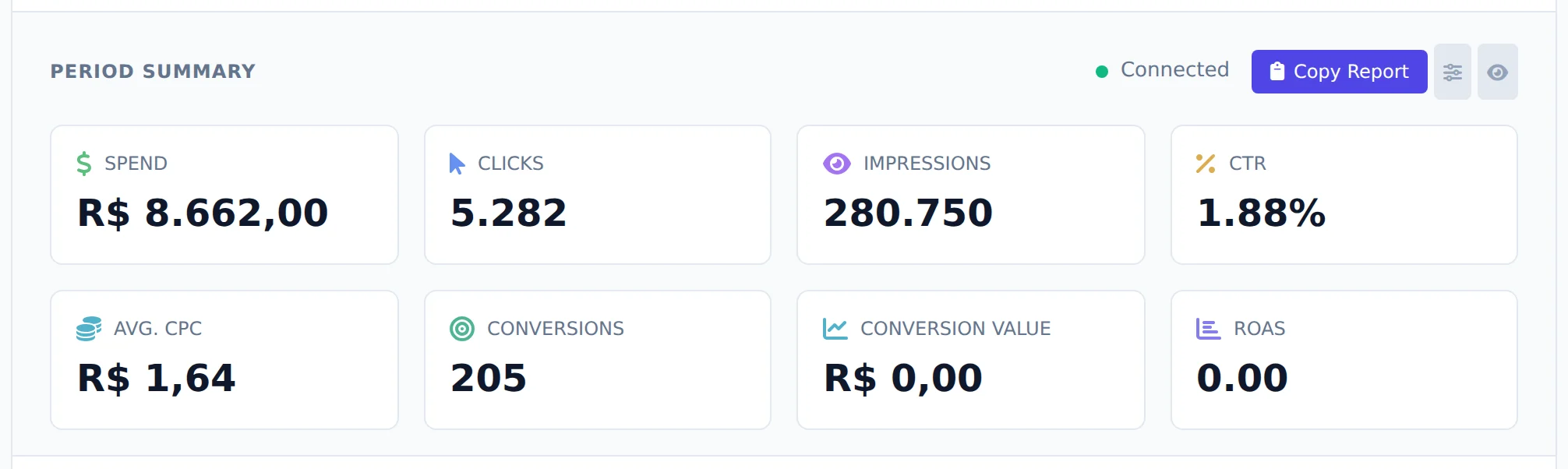
The Period Summary shows spend, clicks, impressions, CTR, average CPC, conversions, conversion value and ROAS for the selection. The indicator next to Copy Report tells you whether the account is active and its payments are up to date.
 12
12- 1Metrics for the period
- 2Copy Report
- 3
See the campaigns
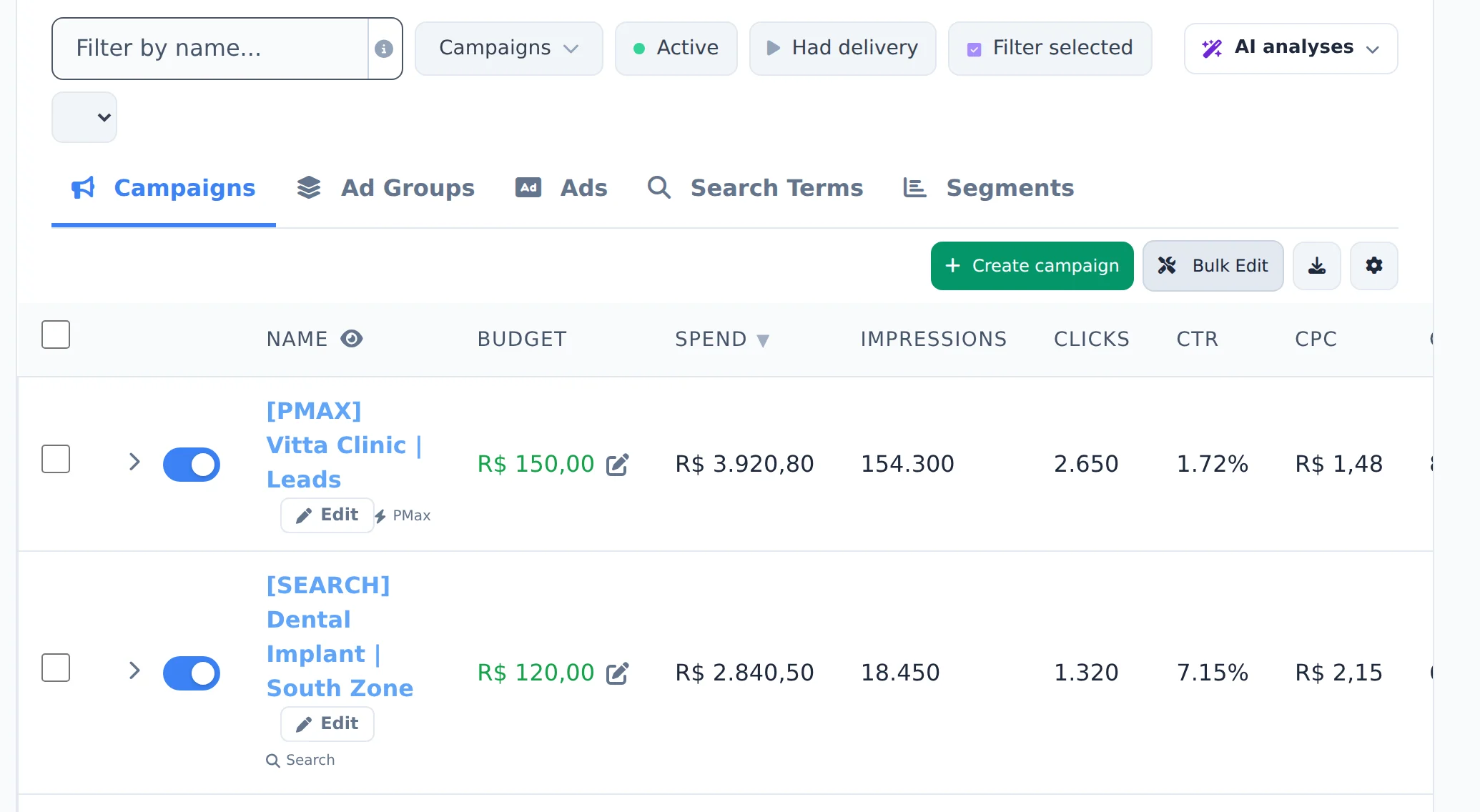
Each row of the table is a campaign, with budget, spend, clicks and conversions. To find a campaign fast, type part of its name in Filter by name... and press Enter. The Active, Had delivery and Filter selected shortcuts sit next to it.
 12
12- 1Filter by name
- 2Campaign row
- 4
Go down to ad groups and ads
The Ad Groups tab shows the level below, and Ads lists the responsive ads with headlines and link. Search Terms shows what people searched before clicking. In the Campaigns tab, the arrow on the row also opens the ad groups right there.
 123
123- 1Ad Groups
- 2Ads
- 3Search Terms
The row switch saves right away
The blue switch next to the name pauses or activates the campaign straight in Google Ads, without asking for confirmation. To select a campaign, use the checkbox on the left.
How to tell it worked
- The account name shows in the selector and its campaigns fill the table.
- The summary numbers change when you switch the period.
- The path to the open level shows above the table, and a click on it goes back up.
If something goes wrong
| Symptom | Likely cause | What to do |
|---|---|---|
| The account is not in the selector | It was not turned on in the Google connection, or you are a member without access to it | Turn the account on in Connect Google or ask the owner to allow it under Team |
| The table is empty | A filter or the Active shortcut is hiding the campaigns | Clear the filters above the table and check the period |
| The account indicator is red | The account is suspended, has no payment method or lost access | Hover over the indicator to see the reason and fix it in Google Ads itself |
Frequently asked questions
How do I navigate between campaigns, ad groups, and ads in Google Ads?
The manager has Campaigns, Ad Groups, Ads and Search Terms tabs. In the Campaigns view, click the expand arrow on a campaign to see the ad groups inside it, and expand an ad group to see its ads, all on the same screen. You can also click a campaign's name to drill into the ad groups view, with a breadcrumb at the top to go back. Google doesn't use traditional ad groups for Performance Max campaigns: when you expand a PMax campaign, you see its asset groups, and its ads can't be edited individually through the Google API. The date filter at the top (Today, Yesterday, Last 7 days, Last 30 days, This month, Last month, Maximum or Custom) applies to all views, and the Refresh button reloads the data.
How do I select accounts in Google Ads and favorite them?
Click the account selector button at the top of Google Ads to open the list. Use the Search accounts field to filter by name, select one or more accounts and click Open; the Clear button deselects everything. You can view data from several accounts at once: campaigns from all selected accounts appear together in the table. Click the star next to an account to favorite it, and it moves to the top of the list on any device. The last account you used is saved and opens automatically on your next visit. The button with the external link icon (Open Google Ads account(s)) opens the selected account directly in Google Ads.
The selector also has Select all (selects the accounts in the list, respecting your search), Shift + click to select a range, and the account groups from Account Center in the Groups (N) row, with Save as group to save your selection.
How do I filter campaigns by name in Google Ads? Is there advanced search?
Use the Filter by name field above the table. Besides simple search, it accepts operators: the plus sign works as OR (black + white shows everything with either term) and the semicolon works as AND (black ; video shows only items with both). The info icon next to the field shows these examples. There are also three quick filters: Active, Had delivery, and Filter selected. The filter applies to the current view: Campaigns, Ad Groups, or Ads.
To find ads by creation or edit date, text, destination URL, or ID, open the Advanced Ad Search, also above the table (available in Google Ads and Meta Ads).
What does the Google account indicator mean (active, suspended, no payment, low balance)?
The indicator at the top of the Google Ads summary (to the left of Copy report) shows the REAL status of the account, not just whether Google is connected:
- Green: active account with approved payment.
- Yellow: payment under review, or prepaid balance running low (3 days or less at your spending rate over the last 7 days).
- Red: account suspended, canceled, closed, or inactive (Inactive account appears), no payment method, account budget ended, balance depleted, no access to the account (your Google login lost access), or Google disconnected.
Hover over the indicator (on mobile, tap it) to see the reason and what to do. With several accounts open, it shows the worst status among them. When Google doesn't respond right away (network or quota), it keeps showing the usual "Connected".
The fix for each case lives in Google Ads itself (billing, suspension, access). If it says "Google disconnected", reconnect under Connect Google. The AI Copilot and the MCP can also check the status of all your accounts at once.
See also
Budget, pause and activate in bulk in Google AdsCreate a Google Ads campaignSearch terms and negative keywords