
Troubleshooting
My ad account does not show up
Four checks, in order, that solve almost every missing account case: turned on, synced, not hidden and allowed for you.
Quick answer
Check, in this order: is the account switched on under Ad Accounts (in Connect Meta or Connect Google)? If it is not in the list, click Re-sync accounts. In the Account Hub, is it under Hidden? If you are a team member, did the owner allow that account for you?
Before you start
- Only the accounts turned on in the connection show up in the rest of the app.
- The connected profile needs access to the account on Meta (directly or through Business Manager) or in Google Ads.
Step by step
Go through the checks in order and stop when the account shows up.
- 1
Is the account switched on?
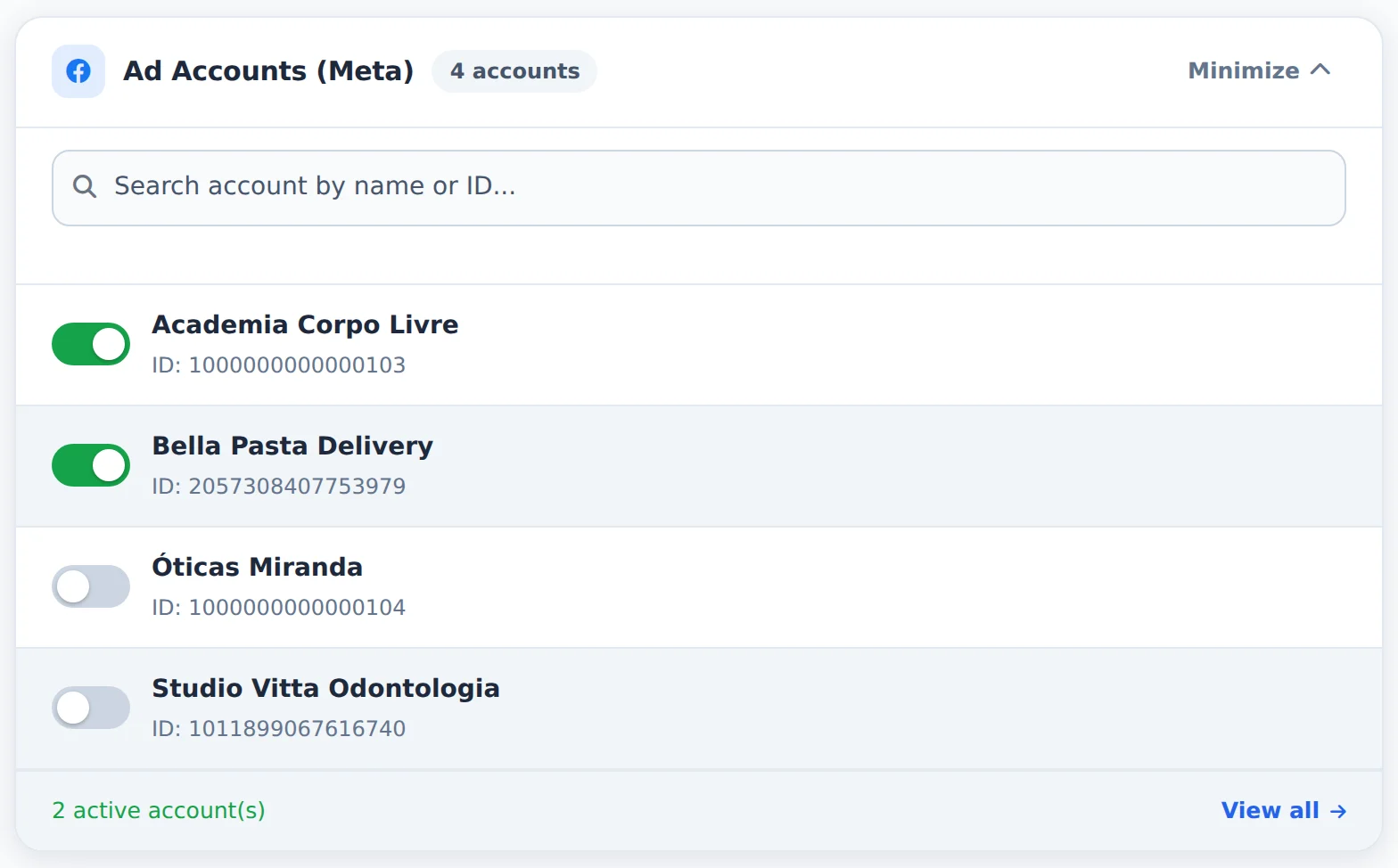
Open Connect Meta (or Connect Google) and look for the account under Ad Accounts. If the switch is off, turn it on. At the plan limit, turn another one off first.
 123
123- 1Search account
- 2Ad accounts
- 3Active accounts
- 2
The account is not even in the list?
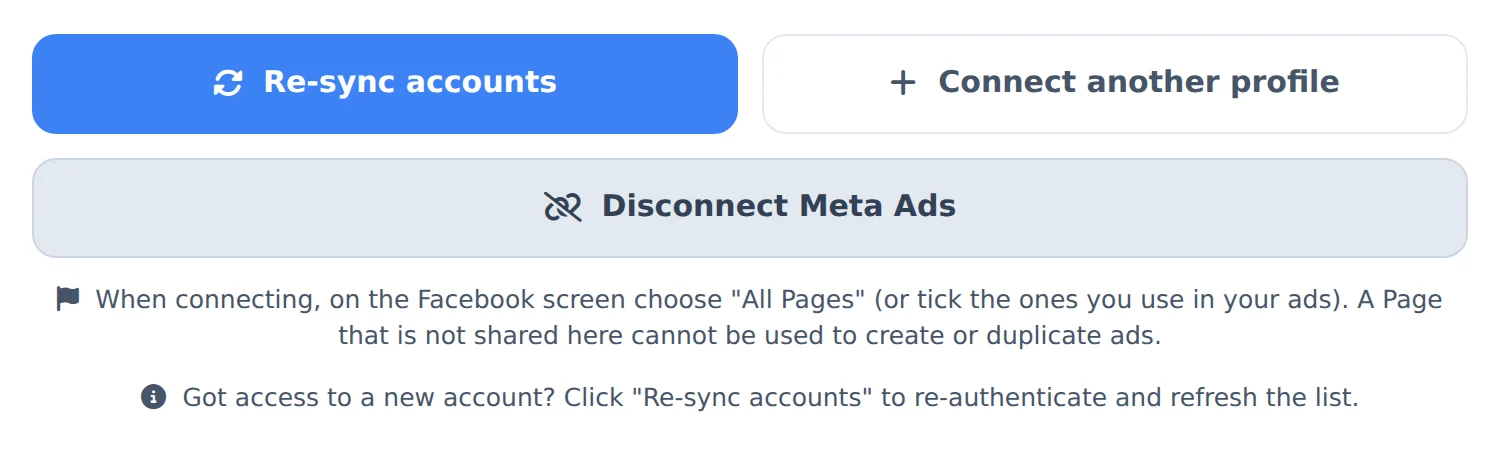
Click Re-sync accounts. If it still does not show up, the connected profile has no access to it: ask the business owner for access, or connect the profile that has access with Connect another profile.
 12
12- 1Re-sync accounts
- 2When to use it
- 3
Was it hidden?
In the Account Hub, click Hidden and restore the account if it is there. The Balance Monitor has its own hidden list.
 123
123- 1Search account
- 2With spend
- 3Hidden
- 4
Are you a team member?
The owner may have limited the accounts you see. Ask them to allow the account in Team, on your profile.
The With spend filter
In the Account Hub, With spend hides the accounts that did not spend in the period. Turn the filter off to see them all.
How to tell it worked
- The account shows up in the Account Hub and in the Meta Ads or Google Ads account picker.
If something goes wrong
| Symptom | Likely cause | What to do |
|---|---|---|
| It says the account is outside your plan | It is not among the active accounts | Turn the account on under Ad Accounts, turning another off if you are at the limit |
| A canceled Google account does not show up | Google does not list canceled accounts | Reactivate the account in Google Ads and re-sync |
Frequently asked questions
My ad account doesn't show up in Ads Editor. What should I do?
If an account isn't showing up:
- Confirm that you finished the connection in Connect Meta (or Connect Google) and authorized all the requested access (ad and Page management).
- In the Ad Accounts panel on that same screen, check whether the account is active. Only active accounts appear in the app, and your plan has a limit on active accounts.
- Check that the connected profile has access to the account in Business Manager. If the account belongs to another profile, use Connect another profile.
- In the Account Center, check that the account isn't hidden (Hidden button) and isn't outside the selected group.
If it still doesn't appear, contact support and include the account ID.
My ad accounts don't show up in the editor's account selector. What should I do?
The editor's selector shows the accounts you selected in the Account Center. Your favorite accounts appear first, with a star. If you see a message saying no accounts are selected, first confirm that your Meta account is connected under Connect Meta in the side menu. Then open the Account Center and select the ad accounts you want to use. Back in the editor, click the Refresh button (next to Search account) to reload the list without losing your current selections. Tip: the Privacy button in the same area hides account names on the screen, which is useful for recording tutorials or sharing your screen with clients.
I connected Google, but my ad account isn't in the list. What should I do?
First, confirm that the Google email you used to connect actually has access to that Google Ads account (check under Admin, Access and security, inside Google Ads itself). Ads Editor lists accounts with direct access as well as child accounts of MCCs: if your login has access to an MCC, the accounts it manages appear automatically, but accounts that were canceled or deactivated in Google aren't listed. If the account belongs to a different Google login, you can add more than one Google profile in Ads Editor, and accounts from all profiles appear together in the selector. If you've already checked everything, disconnect and reconnect Google to renew the authorization. If you're a team member, the account owner may have restricted which Google accounts you can see. In that case, ask the owner to give you access.
Why doesn't one of my accounts show up in the Account Monitor?
A few common reasons: accounts closed or terminated on Meta aren't monitored; accounts that have never spent and have no payment problem are left off the list to avoid clutter; the With delivery filter (on by default) hides accounts with no recent spend, so try turning it off; Problems only mode shows only accounts with problems; and the account may have been hidden, so check the Hidden button. Also, if you use an account selection in Ads Editor, the Monitor only shows the selected accounts. Finally, check that you're on the right tab (Meta Ads or Google Ads).
I'm a member of a team and I don't see all accounts in Account Center and Monitor. Why?
When you sign in as a team member, the account owner decides which ad accounts you can access, and Account Center and Monitor Balance show only those allowed accounts. If your permission was set up with no account restrictions, you see all of the owner's accounts. If you need access to more accounts, ask the owner to adjust your permissions in the Team area. After the change, reload the page to refresh the list.
How do I change which accounts are active or add more within my plan limit?
Active accounts are chosen in Connect Meta (Meta accounts) and Connect Google (Google accounts), in the Ad Accounts panel. Changes save automatically.
If you're already at your plan limit:
- First turn off the accounts you won't use and wait for the active accounts counter to update.
- Then turn on the new ones.
If your selection exceeds the limit, nothing is saved: the footer turns red and shows how many accounts your plan allows. Meta and Google are counted separately: if your plan allows 40 accounts, that means 40 Meta accounts and 40 Google accounts.
If you see This ad account is outside your plan, the account isn't among your active ones. Activate it on the same screen. Need more accounts than your plan allows? Then you need a different plan. On a monthly plan, you can upgrade yourself in My Subscription (Upgrade). On an annual plan, our team handles the change.